Using different license types with Hololight Stream Runtime
Objectives
-
Understand the different types of licenses and relevant license modes you are able to use with Hololight Stream Runtime.
Using different license types
After either entering your activation key or selecting your valid license file, the Hololight Stream Runtime utility will recognize the type of license you have. The license type determines how you are able to use the Hololight Stream Runtime.
Different license types have different requirements about when and how often they need to connect to their license server. Depending on your situation, this license server is either on-premises or needs to be connected to over the internet.
Node-locked license
When you are using a node-based license, at the moment you activate Hololight Stream Runtime, the license you selected to use is assigned to the computer. This can’t be undone. Wiping the computer will only cause the license to become unusable.
Seat-based license
With a seat-based license, the license file or activation key can be used with more than one computer. At the moment an application using the Hololight Stream Runtime starts, the runtime consumes a seat assigned to that license. How that seat behaves depends on the license mode you selected.
When using Hololight Stream Runtime there are two different license modes, floating and roaming. You need to set one of these to activate Hololight Stream Runtime.
Changing the license mode
Go to License > License Mode. Select either Floating or Roaming from the dropdown list.
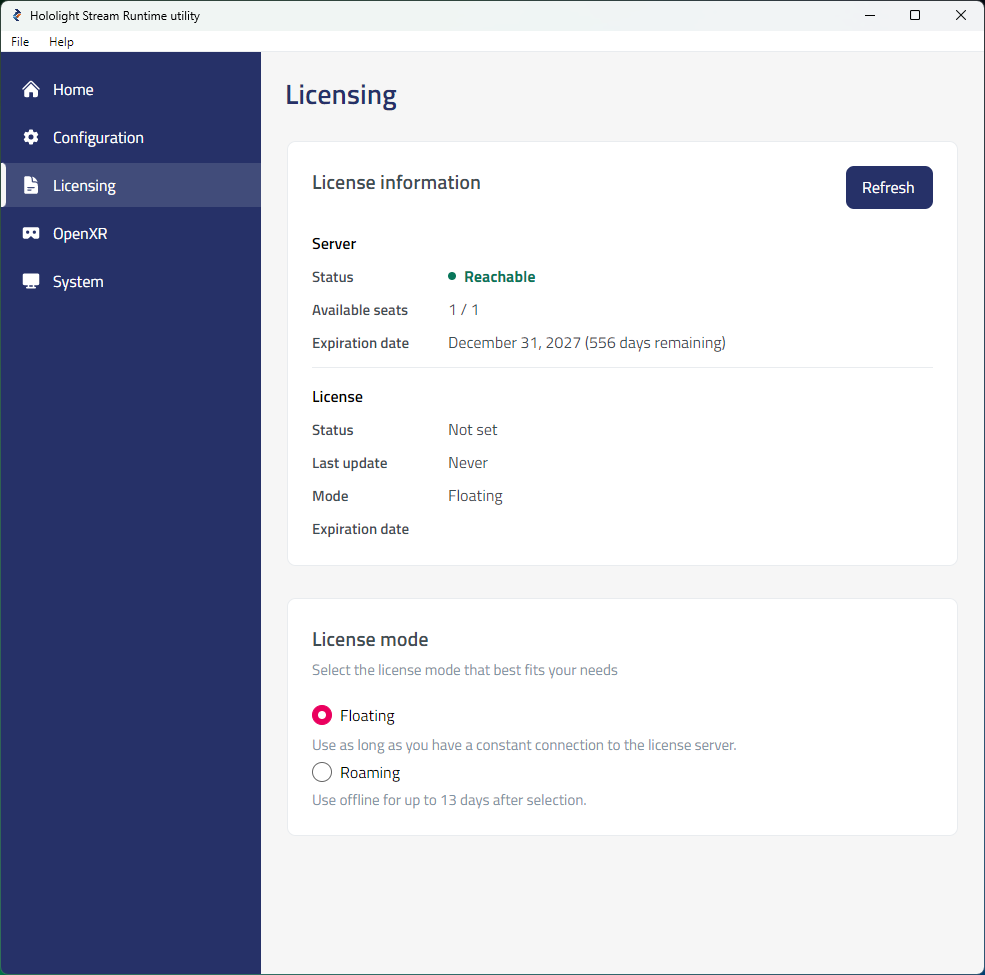
Once you’ve selected the best license type for your situation, you are ready to activate Hololight Stream Runtime.
When to use the floating license mode
Floating license mode lets you use Hololight Stream Runtime as long as your license is valid. However, your machine always needs to stay connected to the license server in order to use Hololight Stream Runtime with this license mode.
When to use the roaming license mode
Roaming license mode lets you use Hololight Stream Runtime for up to 13 days without needing to connect to the license server. After 13 days the machine running Hololight Stream Runtime needs to reactivate the runtime while connected to the license server. You can then use Hololight Stream Runtime with your license for another 13 days before having to repeat the activation.
| To release a seat checked out in roaming mode, just switch to Floating mode. |