How does Hololight Stream work?
Objectives
-
Understand how Hololight Stream works
-
Learn the benefits of using Hololight Stream in terms of data security, performance, and efficiency
How does Hololight Stream work?
Hololight Stream is an advanced XR streaming technology that offloads rendering from XR devices to powerful external servers. By leveraging this technology, it enables real-time, high-fidelity visualization of complex 3D data - without compromising performance or visual quality.
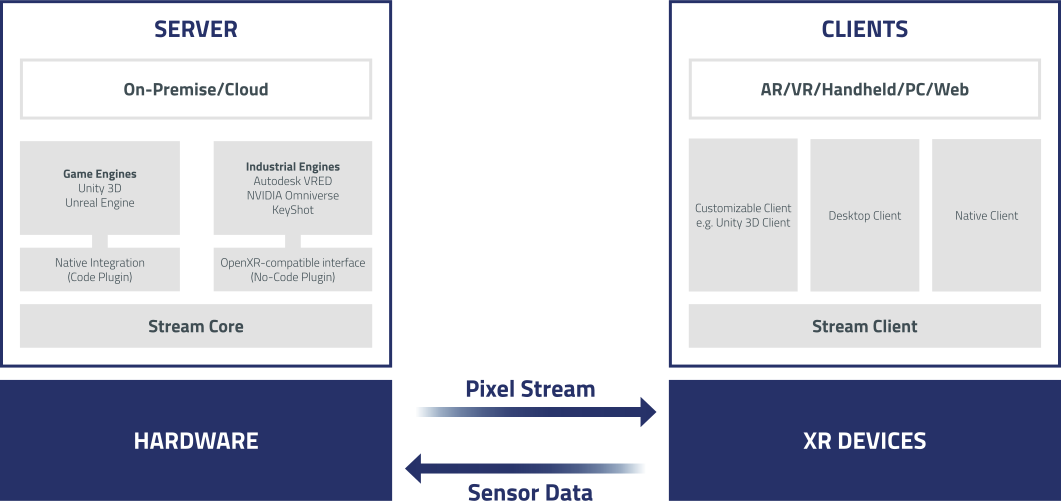
Images rendered by supported engines - such as Unreal Engine, Unity 3D, NVIDIA Omniverse, Autodesk VRED, or KeyShot - are pixel-streamed to the XR device. The rendered pixels are encoded and encrypted before transmission over the network. The XR device decodes the pixels and displays them in their original quality.
These images can be streamed from a local PC, the cloud, or an on-premises server, allowing rendering to occur independent of the XR device’s processing limitations.
Benefits of Hololight Stream
No compromise on data security
3D applications remain secure, as they never leave the data center or cloud environment. There is no storage or processing of data on the XR device itself. Hololight Stream enables streaming over customer-controlled networks, providing an additional layer of security - especially critical for industries handling sensitive data.
Device agnostic approach
Build XR applications with a device-agnostic strategy and benefit from fast, seamless deployment. Any XR device supported by Hololight Stream can be connected and used instantly - no reconfiguration required.