Hololight Stream license information
License information
License information helps you understand and manage your license. The license information only updates when you run an application that supports OpenXR while Hololight Stream is installed and you then select Refresh.
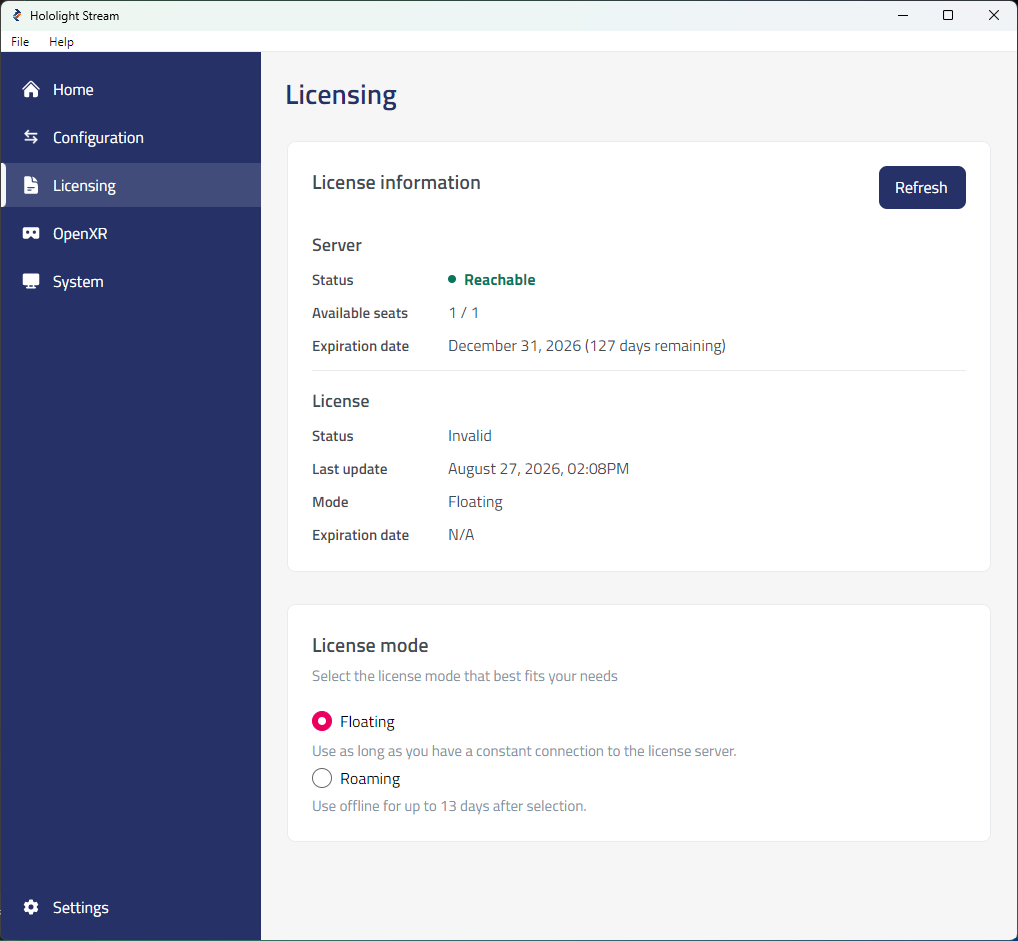
| Setting | Description |
|---|---|
Server status |
Whether the licensing server is reachable |
Available seats |
The number of available seats not consumed and the total number of seats assigned to the license. |
Expiration date |
The date the license expires |
| Setting | Description |
|---|---|
Status |
If a seat from the license is being used |
Last update |
Time of last connection to licensing server |
Mode |
License mode selected |
Expiration date |
The date the license expires |
| Status | Description |
|---|---|
Checked out |
Hololight Stream is active and running with consumed seat. |
Expired |
The license associated with the selected license file is expired. |
Invalid |
The selected license file is incorrect. |
Not set |
You have not selected a license file. |
Released |
Hololight Stream is not using a seat assigned to the license. |
Saturated |
All seats assigned to the license are already taken. Hololight Stream can’t activate. |
| If you encounter issues activating Hololight Stream, you can check a log that keeps track of licensing events. You can find this at "%APPDATA%/Holo-Light GmbH/Hololight Stream Runtime/license_error.log" on your computer. Include this file when submitting support tickets to Hololight. |