Set up Hololight Hub database
Prerequisites
-
Computer, physical or virtualized, for hosting Hololight Hub.
-
Hololight Hub setup wizard.
-
Hololight Hub license file.
-
Your own fully-qualified domain name, along with a domain certificate and corresponding private key
Set up database
At this point you have one of two options. You need a PostgreSQL database server set up to host your Hololight Hub database. This can be one you set up with the setup wizard or one you previously set up.
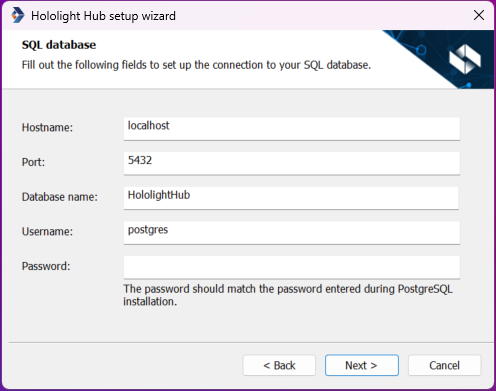
| Field | Description |
|---|---|
Hostname |
Hostname of the database server. The server is either one you set up yourself or the one you set up with this setup wizard. The default value should work if you have been using default values up to this point. |
Port |
This is the port used to access the database server. If you created a database server with this wizard, you entered a port number for the database server in a previous step. The default value should work if you have been using default values up to this point. |
Database name |
This is the name of the database on the server that will hold relational data related to Hololight Hub. You can either enter a previously created database name, which the setup wizard will find and use, or a name for a database that doesn’t exist. The set up wizard will then create and configure a database using the name you enter. For more information see Choosing a database name. |
Username |
This is the username for a database server account that is set up to access the database. If you created a database server with this wizard, the default username will be "postgres". |
Password |
This is the password paired to the username. If you created a database server with this wizard, you created this password in a previous step. |
Choosing a database name
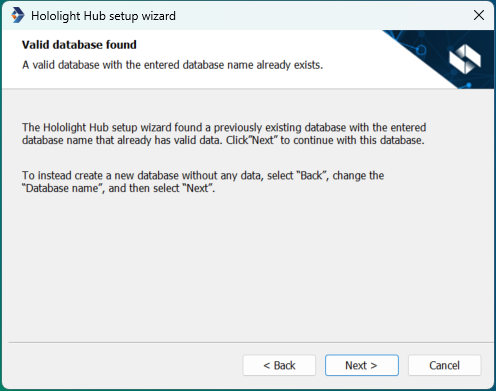
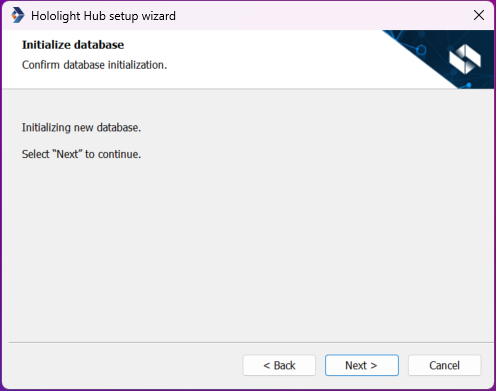
To set up a new database, enter a database name not previously used on the server, and the setup wizard will set up a database with that name to use with Hololight Hub. You can also enter the name of a previously set up database and the Hololight Hub set up wizard will use that.
After database setup
After setting up the database it is time to continue to setting up the Hololight Hub hypervisor and user directory.