Sign out of Hololight Hub on all devices
Sign out on all devices
When you sign in to Hololight Hub, Hololight Hub remembers that you are signed in so that you don’t have to sign in every time you want to use it. This is very convenient, but there might be a situation where you want to be able to sign out on a device that you don’t have on hand. It could also be that you might not remember all the devices you’ve signed into Hololight Hub with. In these and other cases, using the "Sign out on all devices" feature is a great way to know for sure that you aren’t signed in on any devices any more. From there you can start fresh.
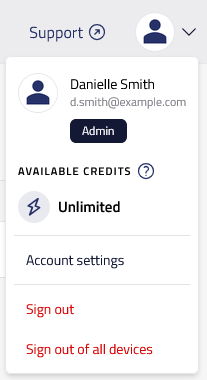
To sign out on all devices, select Account menu > Sign out on all devices to sign out of Hololight Hub on all devices.