Connection issues in Hololight Space
Hololight Space has connection issues when server and client are on the same network
When you open certain applications for the first time, Windows Defender Firewall might block some of their network features and display a prompt asking whether to allow the application access. This is a normal security measure designed to protect your system, and in most cases you can go ahead by just confirming the request.
However, some applications, such as game engines like Unreal Engine or Unity, might not trigger this prompt. In other cases, you might have mistakenly selected "Don’t allow" when the firewall prompt appeared. If that happens, you can manually enable access by following the steps below to allow the required features through the firewall.
-
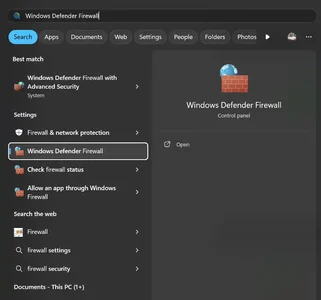
Open Windows Firewall Defender.
-
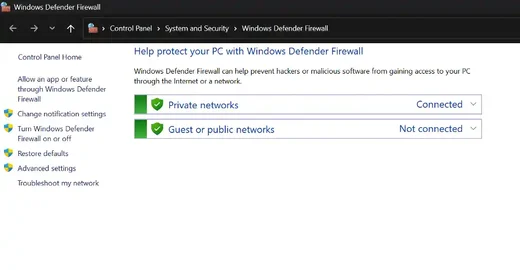
Select Advanced Settings in the left sidebar.
-
Select Inbound Rules in the advanced settings window.
-
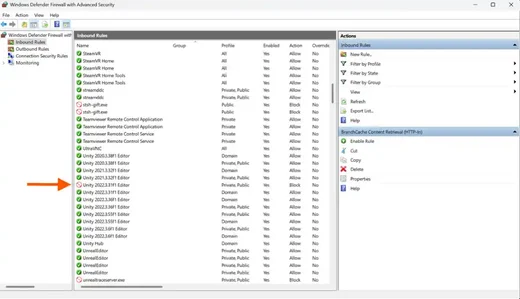
Double-click Hololight Space. In the screenshot a Unity version was selected instead.
-
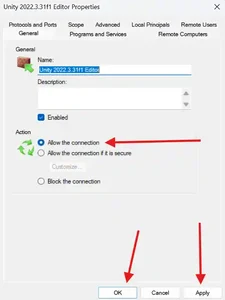
Check the box labeled Allow the connection.
-
Select Apply and then OK.
| If the connection still fails, also try setting an Outbound Rule for Hololight Space |
For more information about protocols and ports, check out our network requirements for Hololight Space.