Get started with the in-application guide for Hololight Space

Objectives

  • Access the in-application getting started guide for Hololight Space.

Prerequisites

  • Hololight Space or Hololight Space Cloud

  • Hololight Space Client on a compatible XR device.

In-application getting started guide

These are essential skills you’ll return to again and again when using Hololight Space. Following this guide will also prepare you to explore more advanced features in the future—helping you fully leverage the power of Hololight Space to streamline your 3D engineering and design workflows.

We recommend opening the PDF directly within Hololight Space. This allows you to follow the guide without leaving the immersive environment. The Getting Started.pdf file is included by default in the installation package (starting with version 2025.0.0) and can be accessed in the following ways:

Method A. Load tutorial from the welcome screen

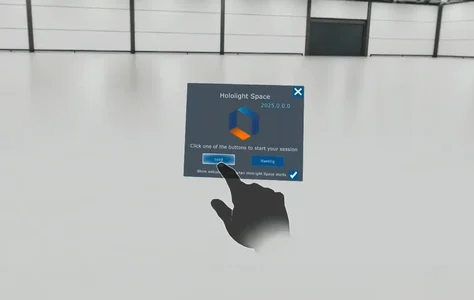
  1. Connect to a Hololight Space server with your XR device. On the welcome screen, select Load.
    Screenshot of Hololight Space running on a mixed reality device with the user selecting load on the welcome screen.

  2. Select Demo Files. "Demo Files" is bookmarked by default at the top.
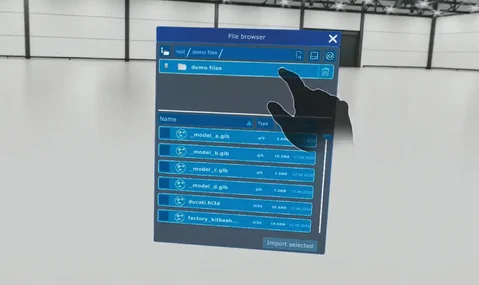
    Screenshot of Hololight Space running on a mixed reality device with the user selecting the demo files folder on the file explorer.

  3. Scroll down and select Getting Started.pdf.
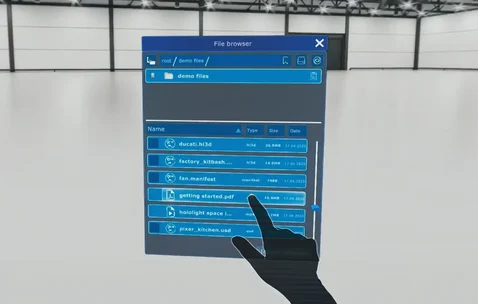
    Screenshot of Hololight Space running on a mixed reality device with the user selecting the getting started PDF from the file explorer.

  4. To move the Getting Started.pdf, grab it at the top. To scale it, grab and drag one of the corners.
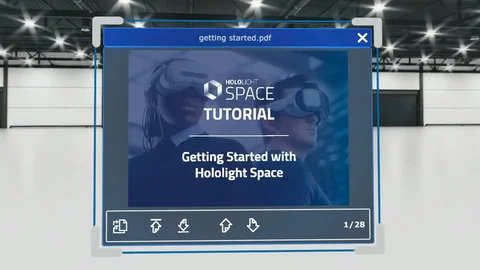
    Screenshot of Hololight Space running on a mixed reality device with the getting started guide open.

Method B. Load tutorial from Quick Menu

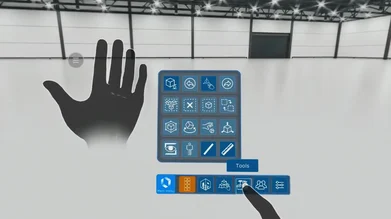
  1. Open the Quick Menu by looking at the palm of your left hand.
    Screenshot of Hololight Space running on a mixed reality device with the user selecting the tools button on quick menu.

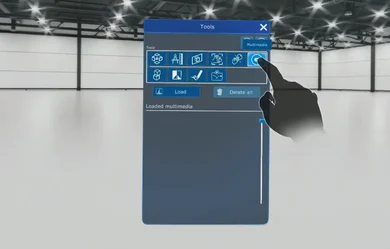
  2. Open the Tools Menu, then select Multimedia in the top-right corner.
    Screenshot of Hololight Space running on a mixed reality device with the user selecting multimedia on the tools panel.

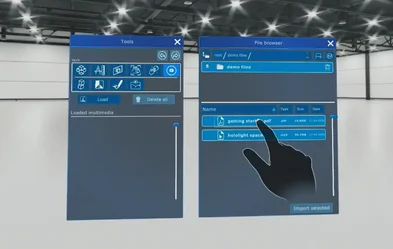
  3. Select Load, then select Getting Started.pdf from the file browser.
    Screenshot of Hololight Space running on a mixed reality device with the user selecting the getting started guide from the file browser having gone through the tools panel.