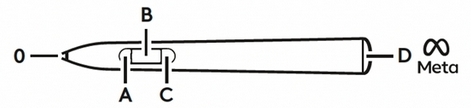
Logitech MX Ink stylus with Hololight Space
Contents
Prerequisites
-
Hololight Space installed on your computer.
-
Hololight Stream Client installed on your supported XR device.
-
Logitech MX Ink stylus.
-
When needed, access to the Meta Horizon, where you can also pair the Logitech MX Ink with your Meta Quest device.
Logitech MX Ink
You can use the Logitech MX Ink stylus with Meta Quest 3 and 3S devices and Hololight Space.
Hololight Space 2026.0.0 expands support for companion devices. This includes the Logitech MX Ink stylus. This guide explains how to pair the stylus with your Meta Quest device and how to use it in Hololight Space.
| Hololight Space currently only supports the Logitech MX Ink Stylus with Meta Quest 3 and Meta Quest 3S. |
Pair your Logitech MX Ink with your Meta Quest device
-
Open the Meta Quest main menu.
-
Go to Settings > Devices > Stylus.
-
Scroll down and select Pair Stylus.
-
Follow the on-screen instructions to complete the pairing process.