Configure Hololight Stream Runtime with the Hololight Stream Runtime utility
Objectives
-
Be able to find important Hololight Stream Runtime settings
-
Understand how each setting affects using Hololight Stream Runtime
Configure Hololight Stream Runtime
| The following describes configuring Hololight Stream Runtime using the Hololight Stream Runtime utility that runs as its own Windows application. When using the Hololight Stream Runtime plugin for Autodesk VRED, which is its own plugin for that application, many of these same settings still apply. |
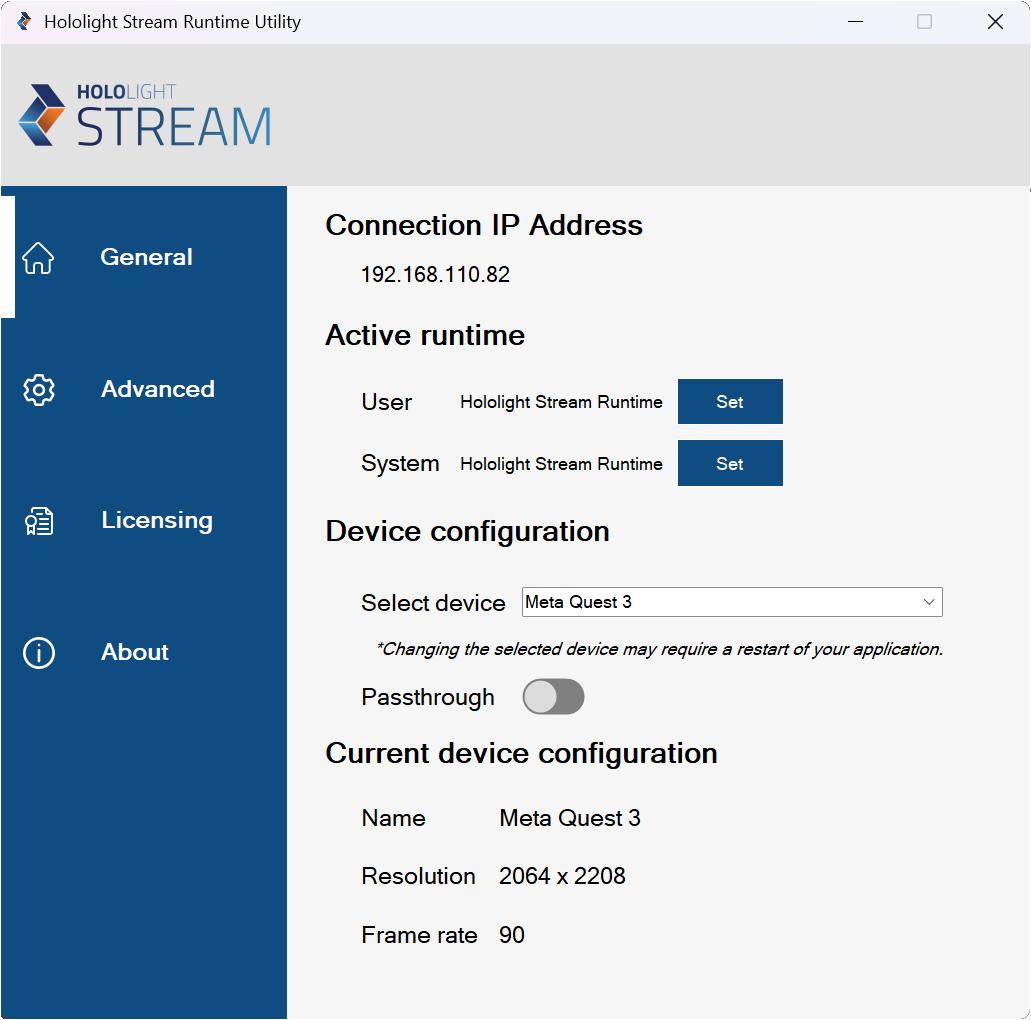
Connection IP address
This is the IP address you can use with Hololight Stream Client to connect to the application. For more information on using this IP address to connect, check out Connect to an application that uses OpenXR using Hololight Stream Runtime.
Active runtime
Current active runtime. The current OpenXR runtime that is being used. You can change this for the user or for the system, and then this will update. You can set the active runtime to ours by selecting Set. For the User this works no problem, but you need admin privileges to set it for the System.
Device configuration
Different client devices have different resolution and other specific demands. You need to select the correct device before connecting to the application with Hololight Stream Client.
Select device
Use the registry to find the installation location and then parses all the configuration JSON files for each of the devices.
Passthrough
This toggle controls whether video passthrough is enabled on devices that support the feature.
| Passthrough will only work if the application also supports passthrough. Check the application’s documentation for more details. |
Setting |
Description |
Name |
Name of the device |
Resolution |
Resolution of the device |
Num Views |
Number of displays on the device. For example, many head-mounted XR devices have two displays, one for each eye |
Frame rate |
Frame rate of the device |